# Plan2Code: AI-Assisted Software Development Workflow
A structured 4-step workflow for developing features and projects with AI assistance. This methodology emphasizes thorough planning before implementation, ensuring well-documented, maintainable code.
 ## Overview
```
🤔 📝 ⚡ 🧹
┌─────────────────┐ ┌─────────────────┐ ┌─────────────────┐ ┌─────────────────┐
│ Step 1 │ │ Step 2 │ │ Step 3 │ │ Step 4 │
│ PLAN │ --> │ DOCUMENT │ --> │ IMPLEMENT │ --> │ FINALIZE │
└─────────────────┘ └─────────────────┘ └─────────────────┘ └─────────────────┘
New Chat New Chat New Chat (per phase) New Chat
```
| Command | Use When |
|---------|----------|
| `/plan2code---init` | Generate AGENTS.md file for new/existing projects |
| `/plan2code---init-update` | Update AGENTS.md with new learnings from coding sessions |
| `/plan2code---quick-task` | Small, quick tasks that don't need full workflow |
| `/plan2code-1--plan` | Starting a new feature (full planning) |
| `/plan2code-1b--revise-plan` | Requirements change mid-implementation |
| `/plan2code-2--document` | After planning, create implementation specs |
| `/plan2code-3--implement` | Execute implementation (one phase per conversation) |
| `/plan2code-4--finalize` | All phases complete, ready to archive |
**Key Rules:**
- Start NEW conversation for each step (and each implementation phase)
- ONE phase per conversation
- Reply "approved" to complete phases
- 90% confidence required before planning completes
See [QUICK-REFERENCE.md](QUICK-REFERENCE.md) for full reference card.
---
## Installation
### Prerequisites
**Node.js** (v14 or later) is required. If you don't have it:
- Download from [nodejs.org](https://nodejs.org/)
- Or: `brew install node` (macOS) | `winget install OpenJS.NodeJS` (Windows) | `sudo apt install nodejs` (Linux)
### Quick Start
```bash
git clone https://github.com/jparkerweb/plan2code.git
cd plan2code
node install.js
```
The interactive installer will guide you through:
- **Global installation** (recommended) - commands available in all projects
- **Local/project installation** - commands for a specific project only
- **Uninstall** - remove previously installed files
## Overview
```
🤔 📝 ⚡ 🧹
┌─────────────────┐ ┌─────────────────┐ ┌─────────────────┐ ┌─────────────────┐
│ Step 1 │ │ Step 2 │ │ Step 3 │ │ Step 4 │
│ PLAN │ --> │ DOCUMENT │ --> │ IMPLEMENT │ --> │ FINALIZE │
└─────────────────┘ └─────────────────┘ └─────────────────┘ └─────────────────┘
New Chat New Chat New Chat (per phase) New Chat
```
| Command | Use When |
|---------|----------|
| `/plan2code---init` | Generate AGENTS.md file for new/existing projects |
| `/plan2code---init-update` | Update AGENTS.md with new learnings from coding sessions |
| `/plan2code---quick-task` | Small, quick tasks that don't need full workflow |
| `/plan2code-1--plan` | Starting a new feature (full planning) |
| `/plan2code-1b--revise-plan` | Requirements change mid-implementation |
| `/plan2code-2--document` | After planning, create implementation specs |
| `/plan2code-3--implement` | Execute implementation (one phase per conversation) |
| `/plan2code-4--finalize` | All phases complete, ready to archive |
**Key Rules:**
- Start NEW conversation for each step (and each implementation phase)
- ONE phase per conversation
- Reply "approved" to complete phases
- 90% confidence required before planning completes
See [QUICK-REFERENCE.md](QUICK-REFERENCE.md) for full reference card.
---
## Installation
### Prerequisites
**Node.js** (v14 or later) is required. If you don't have it:
- Download from [nodejs.org](https://nodejs.org/)
- Or: `brew install node` (macOS) | `winget install OpenJS.NodeJS` (Windows) | `sudo apt install nodejs` (Linux)
### Quick Start
```bash
git clone https://github.com/jparkerweb/plan2code.git
cd plan2code
node install.js
```
The interactive installer will guide you through:
- **Global installation** (recommended) - commands available in all projects
- **Local/project installation** - commands for a specific project only
- **Uninstall** - remove previously installed files
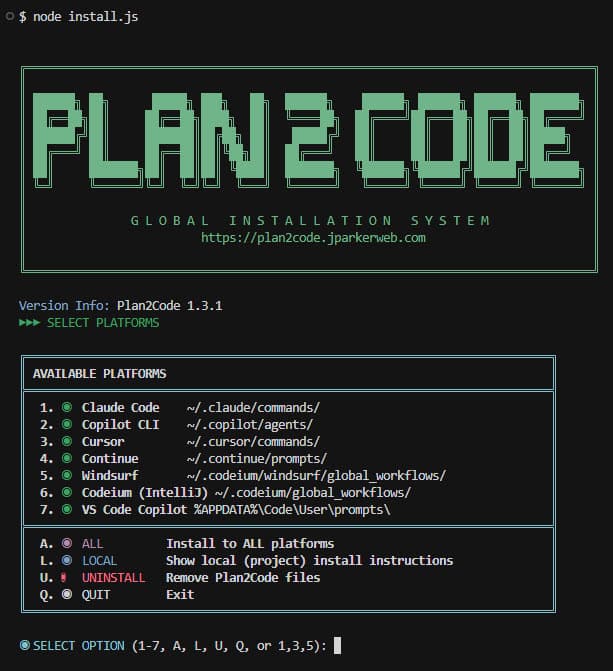 ### Supported Platforms
| Platform | Global Location | Invocation |
|----------|-----------------|------------|
| Claude Code | `~/.claude/commands/` | `/plan2code-1--plan` |
| Copilot CLI | `~/.copilot/agents/` | `--agent=plan2code-1--plan` |
| VS Code Copilot | `~/Library/Application Support/Code/User/prompts/` | Slash commands |
| Windsurf | `~/.codeium/windsurf/global_workflows/` | `/plan2code-1--plan` |
| Cursor | `~/.cursor/commands/` | `/plan2code-1--plan` |
| Continue | `~/.continue/prompts/` | `/plan2code-1--plan` |
| Antigravity | `.agent/workflows/` (project only) | `/plan2code-1--plan` |
### CLI Options
```bash
node install.js # Interactive menu
node install.js --platform claude # Install specific platform
node install.js --local # Install to current project instead of global
node install.js --dry-run # Preview what would be installed
node install.js --uninstall # Remove installed files
node install.js --help # Show all options
```
---
### Supported Platforms
| Platform | Global Location | Invocation |
|----------|-----------------|------------|
| Claude Code | `~/.claude/commands/` | `/plan2code-1--plan` |
| Copilot CLI | `~/.copilot/agents/` | `--agent=plan2code-1--plan` |
| VS Code Copilot | `~/Library/Application Support/Code/User/prompts/` | Slash commands |
| Windsurf | `~/.codeium/windsurf/global_workflows/` | `/plan2code-1--plan` |
| Cursor | `~/.cursor/commands/` | `/plan2code-1--plan` |
| Continue | `~/.continue/prompts/` | `/plan2code-1--plan` |
| Antigravity | `.agent/workflows/` (project only) | `/plan2code-1--plan` |
### CLI Options
```bash
node install.js # Interactive menu
node install.js --platform claude # Install specific platform
node install.js --local # Install to current project instead of global
node install.js --dry-run # Preview what would be installed
node install.js --uninstall # Remove installed files
node install.js --help # Show all options
```
---
Platform Details
### Claude Code CLI
Type `/plan2code-1--plan` in chat. Restart Claude Code after installation.
**Docs:** [Claude Code Slash Commands](https://code.claude.com/docs/en/slash-commands)
### GitHub Copilot CLI
```bash
copilot --agent=plan2code-1--plan --prompt "I want to build a REST API"
```
Requires: `npm install -g @github/copilot@latest`
**Docs:** [GitHub Copilot CLI Custom Agents](https://docs.github.com/en/copilot/concepts/agents/about-copilot-cli)
### VS Code GitHub Copilot
Open Copilot Chat (`Ctrl+Shift+I`), type `/` to see prompts. Requires per-project install via `node install.js --local`.
**Docs:** [VS Code Copilot Prompt Files](https://code.visualstudio.com/docs/copilot/customization/prompt-files)
### Windsurf IDE
Type `/plan2code-1--plan` in Cascade. Note: 12,000 character limit per workflow.
**Docs:** [Windsurf Workflows](https://docs.windsurf.com/windsurf/cascade/workflows)
### Cursor AI
Type `/` in chat, select command from dropdown.
**Docs:** [Cursor Commands](https://docs.cursor.com/agent/chat/commands)
### Google Antigravity
Type `/plan2code-1--plan` in chat. Requires per-project install via `node install.js --local`.
**Docs:** [Customize Antigravity](https://atamel.dev/posts/2025/11-25_customize_antigravity_rules_workflows/)
### Continue (VS Code/JetBrains)
Type `/plan2code-1--plan` in chat. Install the Continue extension first.
**Docs:** [Continue Prompts](https://docs.continue.dev/customize/deep-dives/prompts)
---
Manual Installation
If your AI tool isn't listed or you prefer manual setup:
1. **Copy/Paste:** Copy contents from `src/plan2code-*.md` files into your conversation
2. **File Reference:** Tell the AI: `Please follow the instructions in src/plan2code-1--plan.md`
3. **Custom Integration:** Adapt files from `dist/` directories to your tool's format
---
## Important: Start Fresh Conversations
**Start a new conversation/chat session before each step.** This includes:
- Step 1: New conversation
- Step 2: New conversation
- Step 3: New conversation **for each phase** (Phase 1, Phase 2, etc.)
- Step 4: New conversation
Fresh conversations prevent context pollution and ensure the AI focuses on the current task with the relevant specifications.
---
## The Workflow Steps
### Step 1: Planning Mode 🤔
**Purpose:** Thoroughly analyze requirements and design the solution architecture before writing any code.
**AI Role:** Senior software architect and technical product manager
**Phases (completed one at a time):**
1. **Requirements Analysis** - Extract functional/non-functional requirements, identify ambiguities
2. **System Context Examination** - Review existing codebase, identify integration points
3. **Tech Stack** - Recommend and confirm all technologies (requires user sign-off)
4. **Architecture Design** - Propose patterns, define components, design interfaces/schemas
5. **Technical Specification** - Break down implementation phases, identify risks
6. **Transition Decision** - Finalize plan when confidence reaches 90%+
**Output:** `specs/PLAN-DRAFT-.md` containing the complete implementation plan
**Key Behaviors:**
- AI stops after each phase for clarification
- Must reach 90% confidence before finalizing
- All assumptions are documented
- User must approve tech stack decisions
---
### Step 2: Documentation Mode 📝
**Purpose:** Transform the planning output into structured, actionable implementation documents.
**Required Context:** Attach or reference the `specs/PLAN-DRAFT-.md` from Step 1 (or provide the planning conversation).
**Output Structure:**
```
specs/
└── /
├── overview.md # High-level overview with phase checkboxes
├── Phase 1.md # Detailed tasks for Phase 1
├── Phase 2.md # Detailed tasks for Phase 2
└── Phase N.md # ...additional phases
```
**Document Format:**
- Each phase file contains detailed one-story-point tasks
- All tasks have checkboxes `[ ]` for progress tracking
- Each phase is self-contained (developer needs no prior context)
- Unit/E2E testing excluded unless explicitly requested
---
### Step 3: Implementation Mode ⚡
**Purpose:** Execute the implementation following the documented specifications.
**AI Role:** Senior software engineer
**Required Context:** Provide the path to `specs//overview.md`. The command will auto-detect the next uncompleted phase and read the corresponding `Phase X.md` file automatically.
**Workflow:**
1. Identify the next uncompleted phase (unchecked in `overview.md`)
2. Implement ALL tasks in that phase exactly as specified
3. Update `Phase X.md` checkboxes as tasks complete `[x]`
4. Update `overview.md` phase checkbox when phase completes
5. Perform code review to ensure nothing was missed
6. Add completion summary to the phase document
**Key Rules:**
- **Start a new conversation for EACH phase**
- Work on ONE phase per conversation (unless told otherwise)
- Follow specifications EXACTLY as documented
- Keep checkboxes updated (enables progress tracking across sessions)
- Do NOT run tests unless specified in phase tasks
---
### Step 4: Finalization Mode 🧹
**Purpose:** Validate implementation, create summaries, and archive documentation.
**Required Context:** Attach or reference the `specs//` directory contents.
**Steps:**
1. **Validation** - Verify all tasks implemented correctly, check for issues
2. **Summary** - Document what was built and list all modified/created files
3. **Documentation Review** - Identify any needed README/CHANGELOG updates
4. **Spec Cleanup** - Move completed specs to `specs--completed//`
5. **Final Confirmation** - Confirm completion
---
## How to Use These Prompts
### Option 1: Platform-Specific Slash Commands (Recommended)
This repository includes pre-configured workflow files for all major AI coding assistants. See the [Installation](#installation) section above for platform-specific setup instructions.
**Quick commands after setup:**
```
/plan # Start planning a new feature
/document # Create implementation docs from plan
/implement # Begin/continue implementation
/finalize # Wrap up after all phases complete
```
### Option 2: Direct File Reference
Reference the prompt files directly in your conversation:
```
Please follow the instructions in src/plan2code-1--plan.md
I want to build a user authentication system with OAuth support.
```
### Option 3: Copy/Paste
Copy the contents of each prompt file and paste at the beginning of your conversation when starting that step.
---
## Complete Workflow Example
### Starting a New Project
**Session 1 - Planning (New Chat):**
```
User: [Paste or invoke Step 1 prompt]
I want to build a REST API for a task management application.
AI: 🤔 [REQUIREMENTS ANALYSIS]
... asks clarifying questions, works through phases ...
AI: 🤔 [TRANSITION DECISION]
Confidence: 92%. Creating specs/PLAN DRAFT.md...
```
**Session 2 - Documentation (New Chat):**
```
User: [Paste or invoke Step 2 prompt]
[Attach: specs/PLAN DRAFT.md]
AI: 📝 [DOCUMENTATION]
Creating specs/task-api/overview.md...
Creating specs/task-api/Phase 1.md...
Creating specs/task-api/Phase 2.md...
...
```
**Session 3 - Implementation Phase 1 (New Chat):**
```
User: [Paste or invoke Step 3 prompt]
[Provide: specs/task-api/overview.md]
AI: ⚡ [PHASE 1: Project Setup]
(Auto-detected Phase 1 as next uncompleted phase)
Implementing tasks...
✓ Phase 1 complete. Updated checkboxes in Phase 1.md and overview.md.
```
**Session 4 - Implementation Phase 2 (New Chat):**
```
User: [Paste or invoke Step 3 prompt]
[Provide: specs/task-api/overview.md]
AI: ⚡ [PHASE 2: Database Models]
(Auto-detected Phase 2 as next uncompleted phase)
Implementing tasks...
✓ Phase 2 complete. Updated checkboxes in Phase 2.md and overview.md.
```
**Sessions 5-N - Continue Implementation (New Chat for each phase):**
```
... repeat for each remaining phase ...
```
**Final Session - Finalization (New Chat):**
```
User: [Paste or invoke Step 4 prompt]
[Provide: specs/task-api/overview.md]
AI: 🧹 [VALIDATION]
Verifying implementation...
AI: 🧹 [SPEC CLEANUP]
Moving to specs--completed/task-api/
Implementation complete!
```
---
## Progress Tracking
The checkbox system enables seamless progress tracking across multiple sessions:
**overview.md:**
```markdown
## Phases
- [x] Phase 1: Project Setup
- [x] Phase 2: Database Models
- [ ] Phase 3: API Endpoints <- Next phase to implement
- [ ] Phase 4: Authentication
```
**Phase 3.md:**
```markdown
## Tasks
- [x] Create routes file
- [x] Implement GET /tasks
- [ ] Implement POST /tasks <- Current task
- [ ] Implement PUT /tasks/:id
- [ ] Implement DELETE /tasks/:id
```
---
## Best Practices
1. **Start fresh conversations** - New chat for each step and each implementation phase
2. **Always attach specs** - The AI needs the spec files to understand the current state
3. **Don't skip planning** - The upfront investment prevents costly rework later
4. **Confirm tech stack** - Ensure AI gets explicit approval before architecture design
5. **One phase at a time** - Keeps conversations focused and manageable
6. **Update checkboxes immediately** - Maintains accurate progress state
7. **Review phase output** - Verify each phase before moving to the next
8. **Keep spec files** - The completed folder serves as project documentation
---
## What to Attach at Each Step
| Step | Required Input |
| ------------------ | ---------------------------------------------------- |
| Step 1 (Plan) | None (describe your feature/project) |
| Step 2 (Document) | `specs/PLAN DRAFT.md` or planning conversation |
| Step 3 (Implement) | `specs//overview.md` (auto-detects phase) |
| Step 4 (Finalize) | `specs//overview.md` |
---
## File Structure After Complete Implementation
```
your-project/
├── specs/
│ └── another-feature/ # In-progress feature
│ ├── overview.md
│ └── Phase 1.md
├── specs--completed/
│ └── feature-name/
│ ├── overview.md # Archived with completion summary
│ ├── Phase 1.md # All checkboxes marked [x]
│ ├── Phase 2.md
│ └── ...
├── your project files...
└── README.md
```
---
## Customization
Feel free to modify these prompts to fit your workflow:
- **Add testing phases** - Uncomment/add testing requirements in Step 2
- **Adjust confidence threshold** - Change the 90% threshold in Step 1
- **Modify output structure** - Customize the specs folder organization
- **Add code review steps** - Enhance Step 3 with additional review gates
---
## Troubleshooting
**Slash commands/workflows not recognized:**
- Check if your project's `.gitignore` includes patterns like `.windsurf/`, `.cursor/`, `.continue/`, or `.agent/`
- Many AI tools don't recognize workflows in gitignored directories
- Solution: Use global installation by copying the directories to your home directory (e.g., `cp -r .windsurf ~/`)
**AI jumps ahead to implementation during planning:**
- The prompts explicitly forbid this, but if it happens, remind the AI: "Stay in planning mode. Do not write code yet."
**AI doesn't know what to implement:**
- Make sure you provided the path to `overview.md`
- The AI will auto-detect the next phase and read the corresponding `Phase X.md` file
**Lost progress between sessions:**
- Check `overview.md` for phase status
- Review individual phase files for task completion status
**AI not following spec exactly:**
- Reference the specific phase document and ask it to re-read the requirements
**Too many/few phases:**
- Adjust during Step 2 (Documentation) - phases should represent logical groupings of work